Java Variables
Variables Basics
Variables are one of the most fundamental aspects of any program. Varaibles are like containers where information is stored. They give your program a way to not only store information, but also to access and modify it.
Lets look at an example.
Storing Student Information
The average student has a lot of qualities that we could describe with variables. For example, we could store their name, their age, their GPA, and many more qualities.
Storing these simple pieces of information is actually simple in Java. Take a look.
//---------------------------------------------VARIABLES---------------------------------------------
	// There are many types of variables. Each type stores a different type of information.
	// For example:

	// A String stores a sequence of characters, such as a name or web address.
	static String studentName = "Robert";

	// An int (integer) stores a whole number between -2,147,483,648 and 2,147,483,647, such as an age.
	static int studentAge = 15;

	// A char (character) stores one standard letter, number, or symbol, such as a letter grade.
	static char studentAverageGrade = 'A';

	// A float stores a decimal number, such as a GPA
	static float studentGPA = 4.0f;
Wondering why we added static before declaring the variables? Look into static keywords.
As you can tell from the example above, the syntax (or way of writing) a varible in Java is
[type] [name] = [value].
This format is a little simplified, and you will learn about more ways to modify your variables in the future. Regardless, idea remains the same: you declare what type the variable is, then what you want to name it, then the value that you want to assign it.
You might be wondering how you use these variables that you just declared. Well, it is quite simple actually. Simply type their name in whatever context you want to use them. For example, if you want to print them, you would type the variable name as a parameter for Java’s print statement.
	public static void main(String[] args) {
		System.out.println("Student Name: " + studentName);
		System.out.println("Student Age: " + studentAge);
		System.out.println("Student Ave. Grade: " + studentAverageGrade);
		System.out.println("Student GPA: " + studentGPA);
	}
This would produce this output in the command line:
Student Name: Robert
Student Age: 15
Student Average Grade: A
Student GPA: 4.0
More Variable Types
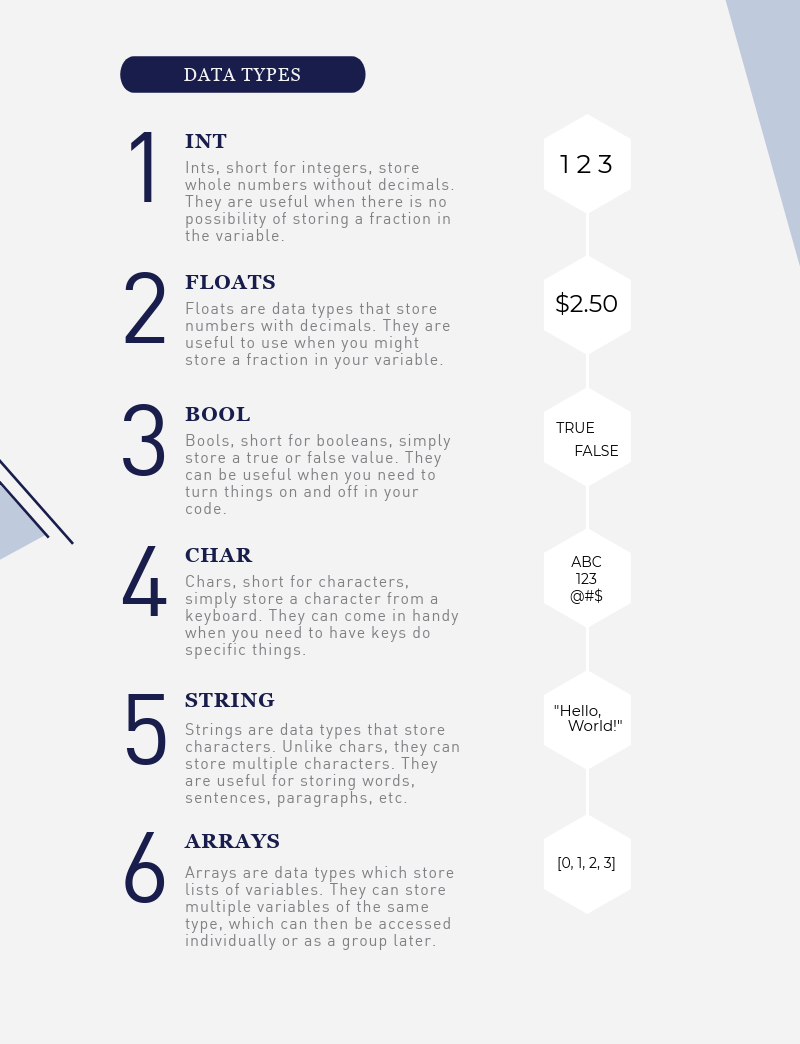
There are many different types of variables. We cannot discuss all of them in this lesson, however listed below are many common variables that you might use in everyday applications.
To learn more, look at the Java Variables Tutorial.