Java While-Loops
While-Loops Basics
Computers are very good at doing repetitive tasks. While humans get tired of doing the same thing over and over, computers can repeat things very easily. For example, as you read this webpage, your computer is continuously checking to see if you click on anything. There are a ton of other examples of when your computer might need to repeat a process, either indefinitly, or while another condition is true.
In programming circles, a repeated process is called a loop. A loop is a repeated block of code. There are a few different types of loops, but the one we are going to discuss is called a while loop. A while loop runs while a certain condition is true. For example, say we want to print “Robert is a kid” and Robert’s age while Robert’s age was under 18. To do this, we would write the following code.
public class RobertKid{
    public static void main(String[] args) {
        String name = "Robert";
        int age = 15;

        while (age < 18){
            System.out.println(name + " is a kid.");
            System.out.println("Age: " + age);
            age = age + 1;
        }
    }
}
There is a lot to break down in the code we just wrote. First of all, we declare Robert’s age as 15. That means every time we re-run the program, his age will start off as 15. Then, we made a while loop like we have been talking about. Inside parentheses, we wrote the condition that we want to be true everytime we run the loop. In this case, we only want it to run while the variable age is under 18. We then placed some code inside of curly braces, just like we did when we were making a new class. The code inside the curly braces is the code that will run every time the loop runs
Inside of the loop, we wrote a print statement that prints the variable name followed by " is a kid". Since the variable name was equal to “Robert”, Robert will be printed as a substitute for name. This means that when the loop runs, it will start off by printing Robert is a kid.
Next, we put "Age: " + age) inside of a print statement. You might be confused by the two instanes of “age” in this case, but don’t get tricked up. The String “Age” will be printed as is, but the variable age will be printed as whatever it is equal to at that moment.
Lastly, we said age = age + 1. As you might guess, this means we add one to the variable age at the end of every loop. This is a very common thing to do in Java, and there are a few ways to write it. You could also add one to a variable by writing varName += 1, or varName++.
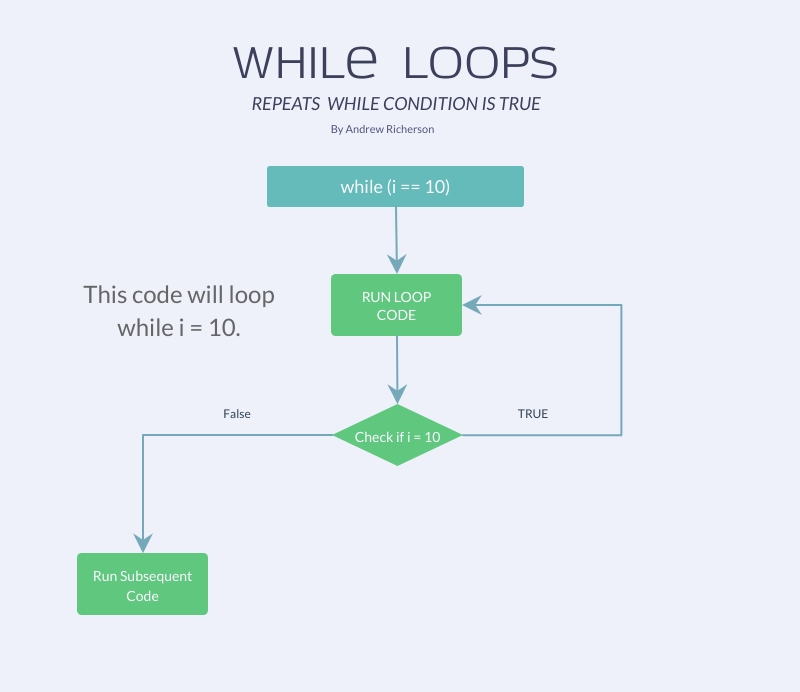
Once the program reaches the end of the loop, it will go back to the beginning and check if the condition is still true. If age < 18, then the loop will run again. If the condition is not true, the program will skip past the code inside of the while loop’s curly braces and continue after the loop.
This code will produce the following output:
Robert is a kid.
Age: 15
Robert is a kid.
Age: 16
Robert is a kid.
Age: 17
Diagram
More Uses
There are a lot more use cases than printing something a few times. For example, you might want to do something indefinitely.
public class CountToInfinity{
    public static void main(String[] args) {
        int i = 0;
        while(true){
            System.out.println(i);
            i++;
        }
    }
}
As the class name suggests, this loop will count to infinity… Well, not exactly since integers can only be in the range -2,147,483,648 to 2,147,483,647, but you get the idea. You might notice that we didn’t put any type of conditional operator in the while loop condition. Instead we put true. Well, since true always evaluates to true, this loop will never be false, and therefore run forever.
If you want to loop some code forever, but only when a condition is true, you can do that, too:
public class PrintJaredsInfo{
    public static void main(String[] args) {
        String name = "Bob";
        int age = 65;
        while (name.equals("Jared")){
            System.out.println(age);
        }

        name = "Jared"
        age = 20;
        while (name.equals("Jared")){
            System.out.println(age);
        }
    }
}
This will code will print 20 over and over. At the top of main, name is declared as being equal to “Bob”. Since the loop only runs if name equals “Jared”, the first loop will not run. After the first loop, name is changed to be equal to “Jared”. The second loop will run indefinitely, since name is equal to Jared when the while loop condition is checked.
Conclusion
while-loops are very important concepts to grasp. They allow you to repeat a process while a condition is true. You could use them to loop some code a certain number of times, or indefinitly.
Can you think of any more cases where you would want to repeat a process over and over?
For more information on while-loops, visit the Java Tutorial on while-loops.