Java If Statements
If Statement Basics
While-loops run a specific block of code over and over while a certain condition is true. But what if you want to run a block of code once if a condition is true. This is where if statements come in.
If statements are a type of control flow statement that run a block of code if a certain condition is true at the time of evaluating the condition. They are increadibly useful, and can help you make more dynamic programs that do things such as respond to user input, search for items in an array, and tons of other things.
If you are already familiar with while-loops, equality and relational operators, or conditional operators, then conditional expressions should be familiar to you. The basic syntax of an if statement is as follows:
if (conditional expression){
    // then run this code
}
This simple type of if statement alone should get you excited. If statements give your program a whole ton of functionality. Let’s look at some examples.
In this example, we want to print something if i is more than 10.
int i = 22;
if (i > 10){
    System.out.println("i is more than 10!");
}
In this example, we want to print something if i is more than 10 and even.
int i = 22;
if (i > 10 && i % 2 == 0){
    System.out.println("i is more than 10 and even!");
}
If Else
Sometimes you want to do something only if your some condition did not evaluate to true. In these situations, you can use an if else statement. The syntax of an if else statement is as follows:
if (someCondition){
    // do something
}
else {
    // do something else
}
Here is an example of when you might want to use an if else statement:
int age = 10;
if (age < 10){
    System.out.println("Your age is less than 10");
}
else{
    System.out.println("Your age is more than 9");
}
This is a simple example, but eventually you will learn that if else statements can be very useful for doing things like looking for specific values in ArrayLists.
Of course, an if else statement could also be written as two if statements, however using two if statements is rather messy and requires your program to evaluate two conditional expressions instead of just one. Here is an example of what this bad method would look like:
int age = 5;
if (age < 10){
    System.out.println("Your age is less than 10");
}
if (age >= 10){
    System.out.println("Your age is more than 9");
}
Else If Statements
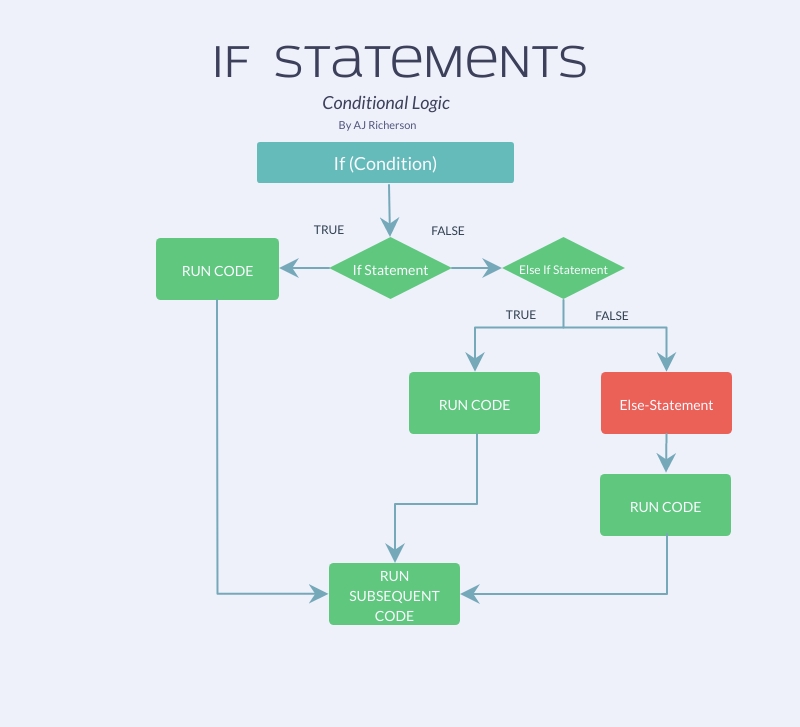
But wait, there’s more! You can also put an else if statement after your if statement. An else if statement only gets evaluated if the if statement (or else if statement) before it evaluated to false.
For example, if you want to check if a user is pressing the up arrow, then check if they are pressing the down arrow if they aren’t pressing the up arrow, you could write your if else statement like this:
 if (userIsPressingUp()){
     // do something if the user is pressing the up key
 }
 else if (userIsPressingDown()){
     // do something if the user is pressing the down key, and not the up key
 }
You might be wondering why we didn’t just write two if statements, one to check if the user is pressing up, and one to check if the user is pressing down. Well, we could have, but it wouldn’t have given us the exact same result as using an else if statement. An else if statement only gets evaluated if the if statment that precedes it is false. In our example, that means that if the user was pressing up, then the program wouldn’t even check if the user was pressing down.
If it helps you think about the control flow better, you could also write it like this:
 if (userIsPressingUp()){
     // do something if the user is pressing up
 }
 else{
     if (userIsPressingDown()){
         // do something if the user is pressing down, but not pressing down
     }
 }
This has the same effect, however is not as clean as using an if else statement.
Diagram
Combining Statements
Now that you know about if statements, if-else statements, and if-else-if statements, you can combine them into complicated and useful control flows like the one below:
if (userIsPressingEsc()){
    // quit
}
else if (userIsPressingVolUp()){
    // volume up
}
else if (userIsPressingCtrl()){
    if (userIsPressingShift()){
        if (userIsPressingN()){
            // New file
        }
    }
    else if (userIsPressingC()){
        // copy
    }
    else if (userIsPressingV()){
        // paste
    }
    else if (userIsPressingSpace()){
        // auto-complete
    }
}
else{
    // continue program
}
For more information on control flow statements, visit the Java tutorial;