Java For-Loops
For-Loops Basics
We have already learned that while-loops are good for looping code while a condition is true, but what if we want to loop some code a specific number of times? We saw that while loops could do this, however it requires you to declare a variable outside the loop, and manipulate the variable in some way towards the end of the loop (like increment or decrement it). What if I told you there was a way to declare a variable, define a condition, and manipulate the variable each loop cycle For-loops give you the ability to do all three of these things in one line.
Here is an example of a for-loop and it’s syntax:
for (int i = 0; i < 10; i++){
    System.out.println("Loop " + i);
    // this will loop 10 times
}
As you can see, in the for-loop, we declared a variable, a condition, and an operation to perform on the variable all in one step.
You can also use different operations in a for loop. For example, if you wanted to print all the even numbers between 0 and 100, you could write a for-loop like this:
System.out.println("Even Numbers: ");
for (int i = 0; i <= 100; i += 2){
    System.out.println(i);
}
Order of Execution
In order to be able to use a for-loop effectivley and without introducting bugs, it is important to understand the order of execution.
The first step of most for-loops is to read the value of a variable. That is where we wrote int variableName = 0. variableName could be anything you wanted, however it is very common to simply use the variable name i or f.
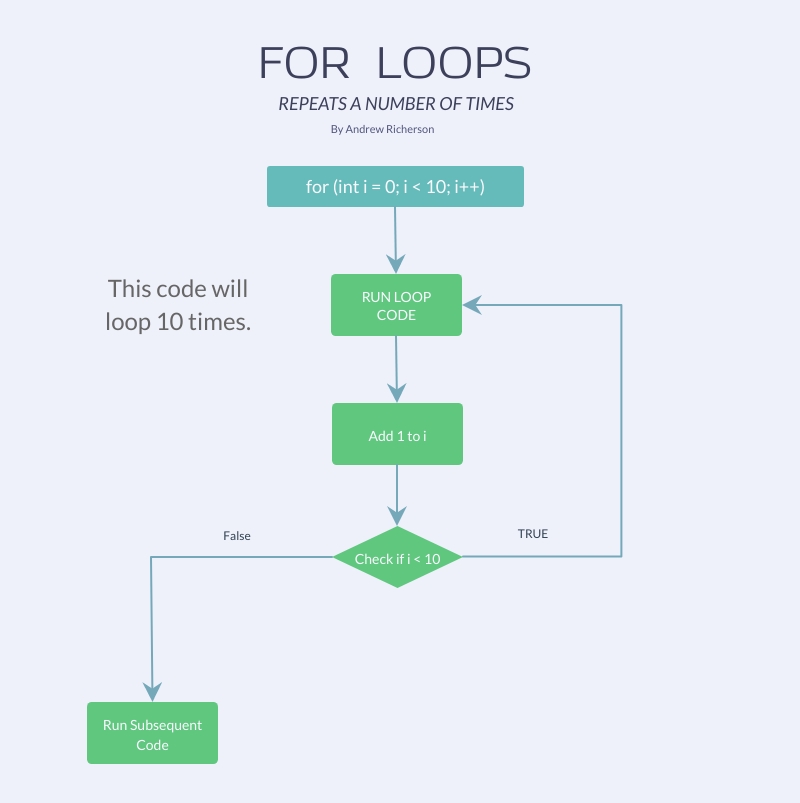
Next, we the loop evaluates the condition. If the condition is true, then the loop is run. If it is false, then the rest of the loop is skipped.
At the end of each loop, some operation is done on the variable. It is very common to see an increment or decrement to the variable in this step.
After the operation is done to the variable, the condition defined in the loop is reevaluted. If the loop condition is true, then the loop runs again, but if it is false, then the loop stops and execution continues after the loop.
Here is a diagram to give you a better picture of what is happening:
To learn more about for-loops, visit the Java tutorials.